-
[Python] Soprano TTS 사용해보기프로그래밍/파이썬 2025. 12. 30. 22:08반응형
AI 프로젝트를 하고 있는데, 이것 저것 찾아보다 TTS 라이브러리가 있어서 써 보려고 했다.
https://huggingface.co/spaces/ekwek/Soprano-TTS
Soprano TTS - a Hugging Face Space by ekwek
Running on Zero
huggingface.co
샘플을 써볼수 있고, 굉장히 가볍고 성능도 좋아 보여서 설치하려고 함.
python -m pip install soprano-tts를 하니 오류 발생 했음.
 Installing build dependencies ... done
  Getting requirements to build wheel ... done
  Installing backend dependencies ... done
  Preparing metadata (pyproject.toml) ... error
  error: subprocess-exited-with-error

  × Preparing metadata (pyproject.toml) did not run successfully.
  │ exit code: 1
  ╰─> [21 lines of output]
      + C:\Users\~\AppData\Local\Microsoft\WindowsApps\PythonSoftwareFoundation.Python.3.13_qbz5n2kfra8p0\python.exe C:\Users\~\AppData\Local\Temp\pip-install-l5f2ooyp\numpy_2735d609359a4c259a0917ed0abeba9f\vendored-meson\meson\meson.py setup C:\Users\~\AppData\Local\Temp\pip-install-l5f2ooyp\numpy_2735d609359a4c259a0917ed0abeba9f C:\Users\~\AppData\Local\Temp\pip-install-l5f2ooyp\numpy_2735d609359a4c259a0917ed0abeba9f\.mesonpy-apkwtuiz -Dbuildtype=release -Db_ndebug=if-release -Db_vscrt=md --native-file=C:\Users\~\AppData\Local\Temp\pip-install-l5f2ooyp\numpy_2735d609359a4c259a0917ed0abeba9f\.mesonpy-apkwtuiz\meson-python-native-file.ini
      The Meson build system
      Version: 1.2.99
      Source dir: C:\Users\~\AppData\Local\Temp\pip-install-l5f2ooyp\numpy_2735d609359a4c259a0917ed0abeba9f
      Build dir: C:\Users\~\AppData\Local\Temp\pip-install-l5f2ooyp\numpy_2735d609359a4c259a0917ed0abeba9f\.mesonpy-apkwtuiz
      Build type: native build
      Project name: NumPy
      Project version: 1.26.4
      WARNING: Failed to activate VS environment: Could not find C:\Program Files (x86)\Microsoft Visual Studio\Installer\vswhere.exe

      ..\meson.build:1:0: ERROR: Unknown compiler(s): [['icl'], ['cl'], ['cc'], ['gcc'], ['clang'], ['clang-cl'], ['pgcc']]
      The following exception(s) were encountered:
      Running `icl ""` gave "[WinError 2] 지정된 파일을 찾을 수 없습니다"
      Running `cl /?` gave "[WinError 2] 지정된 파일을 찾을 수 없습니다"
      Running `cc --version` gave "[WinError 2] 지정된 파일을 찾을 수 없습니다"
      Running `gcc --version` gave "[WinError 2] 지정된 파일을 찾을 수 없습니다"
      Running `clang --version` gave "[WinError 2] 지정된 파일을 찾을 수 없습니다"
      Running `clang-cl /?` gave "[WinError 2] 지정된 파일을 찾을 수 없습니다"
      Running `pgcc --version` gave "[WinError 2] 지정된 파일을 찾을 수 없습니다"

      A full log can be found at C:\Users\~\AppData\Local\Temp\pip-install-l5f2ooyp\numpy_2735d609359a4c259a0917ed0abeba9f\.mesonpy-apkwtuiz\meson-logs\meson-log.txt
      [end of output]

  note: This error originates from a subprocess, and is likely not a problem with pip.
error: metadata-generation-failed

× Encountered error while generating package metadata.
╰─> numpy

note: This is an issue with the package mentioned above, not pip.
hint: See above for details.
그리고 GPT의 대답은
✅ 1️⃣ Visual Studio Build Tools 설치 (정공법, 가장 확실)

이미 Visual Studio가 있어도, C++ 빌드 도구가 없으면 실패함

설치 방법

아래 공식 링크 접속
👉 https://visualstudio.microsoft.com/visual-cpp-build-tools/

실행 후 워크로드 선택

☑ C++ 빌드 도구

☑ MSVC v14.x

☑ Windows 10/11 SDK

설치 완료 후

pip install 라이브러리명


📌 이러면 vswhere.exe도 자동으로 깔림
이런 적이 있었기 때문에 빠르게 설치함.
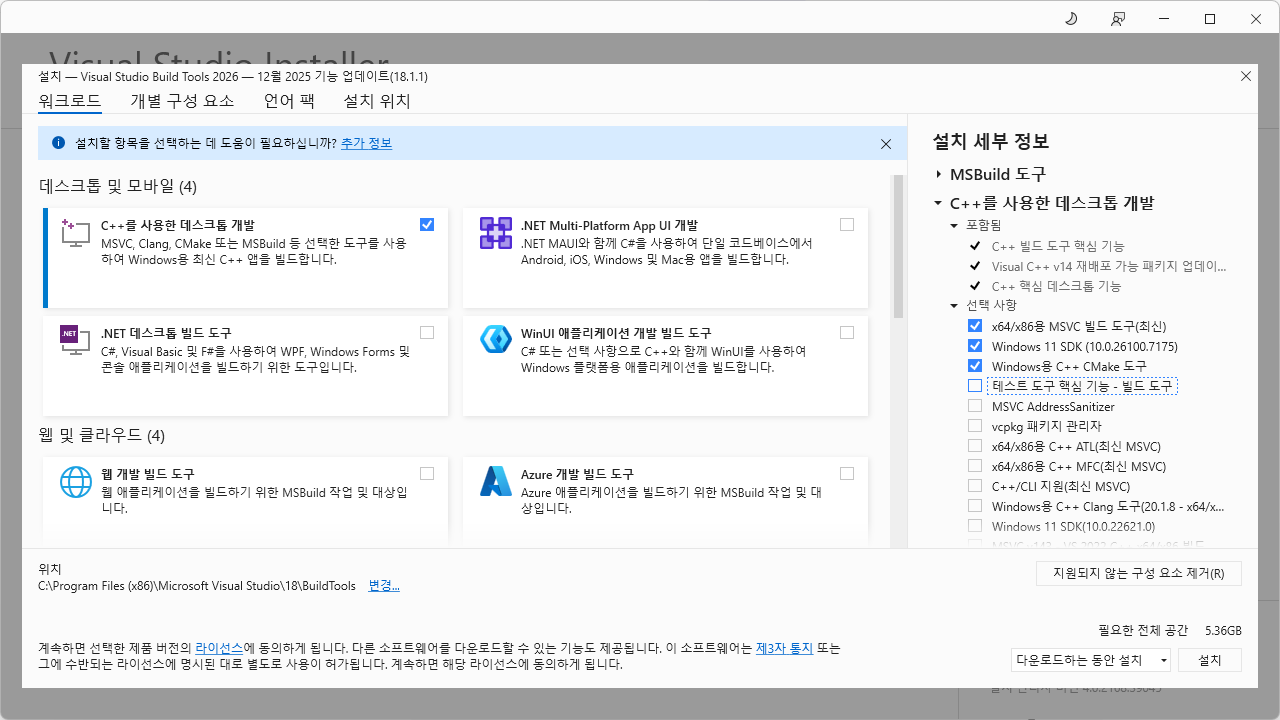
numpy 설치 시 C++ 빌드 도구가 필요한 모양임.
근데 또 뭔가 발생함.
NFO: pip is still looking at multiple versions of lmdeploy to determine which version is compatible with other requirements. This could take a while.
INFO: This is taking longer than usual. You might need to provide the dependency resolver with stricter constraints to reduce runtime. See https://pip.pypa.io/warnings/backtracking for guidance. If you want to abort this run, press Ctrl + C.
ERROR: Cannot install soprano-tts because these package versions have conflicting dependencies.

The conflict is caused by:
    lmdeploy 0.11.1 depends on ray
    lmdeploy 0.11.0 depends on ray
    lmdeploy 0.10.2 depends on ray
    lmdeploy 0.10.1 depends on ray
    lmdeploy 0.10.0 depends on ray
    lmdeploy 0.9.2.post1 depends on ray
    lmdeploy 0.9.2 depends on ray

Additionally, some packages in these conflicts have no matching distributions available for your environment:
    ray

To fix this you could try to:
1. loosen the range of package versions you've specified
2. remove package versions to allow pip to attempt to solve the dependency conflict

ERROR: ResolutionImpossible: for help visit https://pip.pypa.io/en/latest/topics/dependency-resolution/#dealing-with-dependency-conflicts
그래서 찾아 보니...
이럴수가
⚠️ 2️⃣ Python 버전 확인 (중요)

ray는 Python 버전에 매우 민감해.

Python	ray 지원
3.8	✅ 안정
3.9	✅ 권장
3.10	✅
3.11	⚠️ 일부 버전만
3.12	❌ 거의 불가
3.13인 나에게는 불가능한 일이었따...
그래서 3.10버전 깔기로 함.
https://www.python.org/downloads/release/python-31011/
Python Release Python 3.10.11
The official home of the Python Programming Language
www.python.org
왜 3.10.11로 깔기로 했느냐. 3.10.19도 있지만
3.10.11만 window installer 지원을 해줌. 이후 부터는 bugfix 버전이라 소스 설치만 제공하는데, 소스 설치 하고 싶지도 않고, 할줄도 모름.
잘깔면 이렇게 치면 결과가 나온다.
py -3.10 --version

Python 3.10.11
이건 좀 신기하네.
그리고 다시 진행. 파이썬 새로운 버전 깔았으니, env를 쓰기로 함.
올바른 윈도우 + ray 설치 루트 (추천)
1️⃣ Python 3.10 가상환경 확인
py -3.10 -m venv ray-env
ray-env\Scripts\activate
python --version


👉 반드시 Python 3.10.x

2️⃣ pip 최신화 (중요)
python -m pip install -U pip setuptools wheel

3️⃣ ray wheel로만 설치
pip install ray


정상이라면:

.whl 파일 다운로드

컴파일 로그 ❌

몇 분 내 설치 끝

확인:

python -c "import ray; print(ray.__version__)"
그래서 다시 진행!
python -m pip install soprano-tts깔게 많은지 한참 걸린다. 신기하다.
그리고 Pycharm에서 또 venv 경로 지원안해주는 줄 알고 쫄았는데, Scripts 안에 있는 python 경로 잡아주니 자동으로 라이브러리 인식함.
그리고 돌려보니~
Using backend lmdeploy.
Traceback (most recent call last):
  File "C:\dev\tts\sop_main.py", line 3, in <module>
    model = SopranoTTS()
  File "C:\dev\ray-env\lib\site-packages\soprano\tts.py", line 34, in __init__
    self.pipeline = LMDeployModel(device=device, cache_size_mb=cache_size_mb)
  File "C:\dev\ray-env\lib\site-packages\soprano\backends\lmdeploy.py", line 12, in __init__
    cache_size_ratio = cache_size_mb * 1024**2 / torch.cuda.get_device_properties('cuda').total_memory
  File "C:\dev\ray-env\lib\site-packages\torch\cuda\__init__.py", line 616, in get_device_properties
    _lazy_init()  # will define _get_device_properties
  File "C:\dev\ray-env\lib\site-packages\torch\cuda\__init__.py", line 403, in _lazy_init
    raise AssertionError("Torch not compiled with CUDA enabled")
AssertionError: Torch not compiled with CUDA enabled
에린이 울린다...
🔴 에러의 정확한 뜻
AssertionError: Torch not compiled with CUDA enabled


👉 CPU용 PyTorch가 설치되어 있는데
👉 코드에서 CUDA(GPU) 를 쓰려고 해서 터진 거야.

ray / lmdeploy / sprano 자체 문제 ❌
PyTorch 설치 옵션 문제 100%.

✅ 해결 루트 (정답은 하나)
1️⃣ 현재 torch 상태 확인

PyCharm Terminal 또는 cmd에서:

python -c "import torch; print(torch.__version__); print(torch.cuda.is_available())"


지금 출력은 아마:

False

2️⃣ CPU용 torch 완전히 제거
pip uninstall torch torchvision torchaudio -y

3️⃣ CUDA용 torch 설치 (중요)

Windows + Python 3.10 + NVIDIA GPU 기준

CUDA 12.1 (가장 무난)
pip install torch torchvision torchaudio --index-url https://download.pytorch.org/whl/cu121


설치 끝나면 바로 확인:

python -c "import torch; print(torch.cuda.is_available()); print(torch.cuda.get_device_name(0))"


👉 True + GPU 이름 나오면 성공 🎉
torch 라이브러리는 무려 2기가가 넘는다. 후. 정리해보면 CPU를 사용하는 torch를 제거하고, GPU를 사용하는 torch를 설치하는 것으로 보인다. soprano는 cpu 생성은 지원하지 않고, GPU를 사용하는 것만 지원함.
5060Ti 오우너인 나는 사용 가능하다 이말.
또 돌려보니!
역시나! 썅
러 정확한 의미
AssertionError: Can not find $env:CUDA_PATH


👉 Windows 환경변수 CUDA_PATH가 없음
👉 즉:

❌ CUDA Toolkit (nvcc) 미설치 또는

❌ 설치돼 있는데 환경변수 미등록

⚠️ 중요
아까 말한 것처럼:

PyTorch 자체는 CUDA Toolkit 없어도 됨

❗ 하지만 일부 라이브러리(ray / custom op / 컴파일 단계) 는 nvcc를 요구

지금 너 상황은 후자야.

선택지는 딱 2개 (상황별 추천 있음)
✅ 선택 1️⃣ CUDA Toolkit 설치 (가장 확실 / 추천)

👉 컴파일이나 native 확장 쓰는 경우 필수

1️⃣ CUDA Toolkit 설치

공식 링크:
👉 https://developer.nvidia.com/cuda-downloads

선택:

OS: Windows

Architecture: x86_64

Version: CUDA 12.1 (torch cu121과 맞춤)

설치 타입:

Express (권장)
쿠다가 뭔데 자꾸, 나를 괴롭혀
여튼 설치함. 또 2기가. 심심하면 2기가. 아 SSD를 그냥 5T짜리로 살걸. 돈 없어서 1T산 내가 원망스럽다. 지금은 가격이 더 많이 올라서 비쌀텐데...
후 AI 찍먹 어렵다 정말로...
UserWarning:
NVIDIA GeForce RTX 5060 Ti with CUDA capability sm_120 is not compatible with the current PyTorch installation.
The current PyTorch install supports CUDA capabilities sm_50 sm_60 sm_61 sm_70 sm_75 sm_80 sm_86 sm_90.
If you want to use the NVIDIA GeForce RTX 5060 Ti GPU with PyTorch, please check the instructions at https://pytorch.org/get-started/locally/
후 RTX5060Ti 유저로서 너무 빠른 거였구만 후훟
아… 이건 네가 뭔가를 잘못해서 나온 에러가 아니라,
GPU가 너무 최신이라 생태계가 아직 못 따라온 케이스야 😅
그래도 해결 루트는 명확해. 침착하게 보자.

🔴 에러 정확한 의미
RTX 5060 Ti
CUDA capability sm_120


하지만 현재 설치된 PyTorch는:

sm_50 ~ sm_90 까지만 지원


👉 즉,

RTX 5060 Ti = Blackwell 계열 (SM 12.0)

현재 PyTorch stable 릴리스가 아직 sm_120을 포함하지 않음

⚠️ CUDA Toolkit 12.1 설치 여부랑은 무관
→ PyTorch 바이너리 자체가 GPU를 모르는 상태

선택지는 3가지 (현실적인 순서)
✅ 선택 1️⃣ PyTorch Nightly (미리보기) 빌드 사용 ← 가장 현실적

RTX 50xx 쓰는 사람들 지금 거의 다 이 루트야.

🔹 기존 torch 제거
pip uninstall torch torchvision torchaudio -y

🔹 Nightly CUDA 빌드 설치
pip install --pre torch torchvision torchaudio ^
  --index-url https://download.pytorch.org/whl/nightly/cu124


⚠️ cu121 ❌
⚠️ cu118 ❌
👉 cu124 이상 + nightly 필수

설치 후 확인:

python -c "import torch; print(torch.cuda.is_available()); print(torch.cuda.get_device_name(0))"


이게 되면 GPU 인식 성공 🎉

⚠️ Nightly 관련 현실 체크

안정성: ❌ (가끔 API 깨짐)

성능: ✅

LLM / 추론 용도: 대체로 OK

운영 서버: ❌

👉 개발/개인용이면 충분히 감수할 만함
ERROR: Invalid requirement: 'torchaudio-2.10.0.dev20251025+cpu-cp310-cp310-win_amd64': Expected end or semicolon (after name and no valid version specifier) torchaudio-2.10.0.dev20251025+cpu-cp310-cp310-win_amd64 ^ (ray-env) C:\dev>python -m pip install --no-index --find-links=. torchaudio-2.10.0.dev20251025_cpu-cp310-cp310-win_amd64 Looking in links: . ERROR: Could not find a version that satisfies the requirement torchaudio-2.10.0.dev20251025_cpu-cp310-cp310-win_amd64 (from versions: none) ERROR: No matching distribution found for torchaudio-2.10.0.dev20251025_cpu-cp310-cp310-win_amd64 (ray-env) C:\dev>python -m pip install --no-index --find-links=. torchaudio Looking in links: . ERROR: Could not find a version that satisfies the requirement torchaudio (from versions: none) ERROR: No matching distribution found for torchaudio (ray-env) C:\dev>python --version Python 3.10.11 (ray-env) C:\dev>python --version Python 3.10.11 (ray-env) C:\dev>python -m pip install --no-index --find-links=. torchaudio Looking in links: . ERROR: Could not find a version that satisfies the requirement torchaudio (from versions: none) ERROR: No matching distribution found for torchaudio (ray-env) C:\dev>python -m pip install --no-index --find-links=. torchaudio-2.10.0.dev20251025_cu128-cp310-cp310-win_amd64.whl ERROR: Invalid wheel filename (invalid version): 'torchaudio-2.10.0.dev20251025_cu128-cp310-cp310-win_amd64' (ray-env) C:\dev>python -m pip install --no-index --find-links=. torchaudio-2.10.0.dev20251025_cu128-cp310-cp310-win_amd64 Looking in links: . ERROR: Could not find a version that satisfies the requirement torchaudio-2.10.0.dev20251025_cu128-cp310-cp310-win_amd64 (from versions: none) ERROR: No matching distribution found for torchaudio-2.10.0.dev20251025_cu128-cp310-cp310-win_amd64 (ray-env) C:\dev>삽질 하다 일단 실패.
나중에 도전해보기로 함.
반응형'프로그래밍 > 파이썬' 카테고리의 다른 글
[Python] Lol API 이용해보기 (0) 2023.05.23 [Python] Unicode에 관해서. (0) 2022.12.23 [Python]ffmpeg: FileNotFoundError: [WinError 2] 지정된 파일을 찾을 수 없습니다. (2) 2022.09.07 [Python] Telegram bot API에 관해서 (0) 2022.01.13 [Python] 참고 및 이슈 (0) 2020.06.03